The short answer#
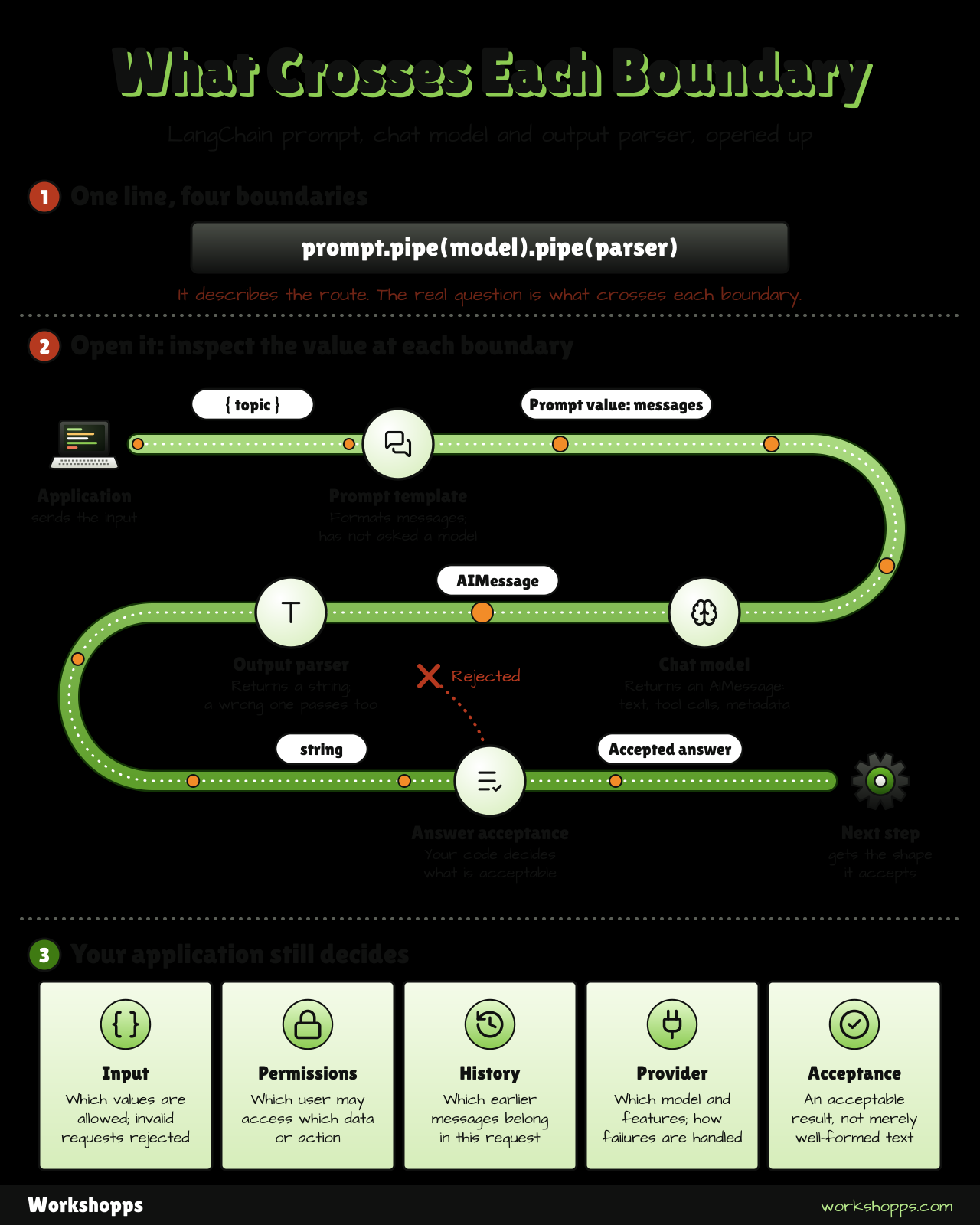
A prompt template turns input values into messages, a chat model returns a response message, and an output parser converts that response into the shape the next step accepts. LangChain connects these components through a common interface. Your application still owns input checks, permissions, conversation history and the decision to accept an answer.
Open the chain before you shorten it#
Suppose the Learning Companion, the assistant built in the workshop, explains a software concept. You give it a topic and expect a short explanation. Session 2 of the LangChain & LangGraph workshop builds this prompt → model → parser step. The expression prompt.pipe(model).pipe(parser) describes the route, but the useful engineering question is what crosses each boundary.
Here is the route for a simple text answer about a FIFO (first in, first out) queue:
| Boundary | Value in this example | What to inspect |
|---|---|---|
| Application → prompt | { topic: "a FIFO queue" } | Is the required input present and acceptable? |
| Prompt → model | A chat prompt value containing system and human messages | Did the intended topic reach the right message? |
| Model → parser | An AIMessage, the model's response object | Is this the kind of response the application expects? |
| Parser → application | A string | Does the answer meet the application's acceptance rules? |
An interface is an agreement about how to call a component and what it returns. LangChain's chat prompt reference and model guide describe different jobs: formatting a conversation and obtaining a response. Calling invoke on both does not make their jobs identical.
The example below opens those boundaries first, then joins them. It isolates one lesson from the Learning Companion: composing model-facing work while keeping its inputs and outputs visible.
Run the boundaries without a provider account#
Use Node.js 22 or later in a new folder. These commands install the version of the core package used for this example and a TypeScript runner:
mkdir langchain-boundaries
cd langchain-boundaries
npm init -y
npm install @langchain/core@1.5.0
npm install --save-dev tsx
Save the following as boundaries.ts, then run npx tsx boundaries.ts.
This uses LangChain's FakeListChatModel, which supplies preset responses. The example makes no model API calls and needs no API key. Its purpose is to verify the connections; it cannot demonstrate whether a real model follows instructions or explains a concept correctly.
import assert from "node:assert/strict";
import { ChatPromptTemplate } from "@langchain/core/prompts";
import { StringOutputParser } from "@langchain/core/output_parsers";
import { FakeListChatModel } from "@langchain/core/utils/testing";

async function main() {
  const prompt = ChatPromptTemplate.fromMessages([
    ["system", "Explain software concepts in two short sentences."],
    ["human", "Explain {topic}."],
  ]);
  const expected = "A queue holds items. The first item added is removed first.";
  const model = new FakeListChatModel({ responses: [expected] });
  const parser = new StringOutputParser();
  const input = { topic: "a FIFO queue" };

  if (!input.topic.trim()) throw new Error("A topic is required");

  const promptValue = await prompt.invoke(input);
  const messages = promptValue.toChatMessages();
  console.log("messages:", messages.map((message) => message.content));
  assert.equal(messages.length, 2);
  assert.equal(messages[1].content, "Explain a FIFO queue.");

  const reply = await model.invoke(promptValue);
  console.log("reply content:", reply.content);
  const text = await parser.invoke(reply);
  assert.equal(text, expected);

  const chain = prompt.pipe(model).pipe(parser);
  const composed = await chain.invoke(input);
  assert.equal(composed, text);
  console.log("composed output:", composed);

  await assert.rejects(() => prompt.invoke({} as { topic: string }));
  console.log("Missing-variable check passed");
}

main().catch((error: unknown) => {
  console.error(error instanceof Error ? error.message : "Example failed");
  process.exitCode = 1;
});
The message log contains the instruction followed by Explain a FIFO queue. Both the reply content and composed output are A queue holds items. The first item added is removed first. The final line is Missing-variable check passed.
The preset model has one response, so both invocations return that response. A real model may produce different answers on successive calls; exact equality between two generated answers would be a different and usually unsuitable check.
Read the three component contracts#
The prompt formats messages#
prompt.invoke(input) substitutes the topic and returns a chat prompt value. It has not asked a model anything. Calling toChatMessages() exposes the messages inside that value.
In this example, the first message carries the stable instruction. The second carries the changing topic. The assertion checks the actual formatted text, so a renamed variable or unintended template change becomes visible before generation.
The non-empty-topic check belongs to our code. The template also rejects the deliberately missing variable at the end. These checks answer different questions: “does it meet our input rule?” and “is a value supplied?” Neither check establishes whether a request is authorised.
The TypeScript assertion as { topic: string } deliberately bypasses the compiler's expected shape for that one negative check. It does not add a topic at runtime. Keep this deliberate invalid input confined to the check.
The chat model returns a message#
model.invoke(promptValue) consumes the formatted input and returns an AIMessage. With a provider integration, this is where model inference happens. With our fake model, this is where a preset response enters the flow.
A response message can hold more than prose: tool calls, content blocks and metadata may matter to the application. LangChain's message guide documents those fields. Treating every response as plain text can hide information the next step needs.
Our example is deliberately a text-only path. It has no tools, retrieved documents, streaming or retained conversation history.
The parser produces the next value#
parser.invoke(reply) produces a string. The StringOutputParser reference shows this text-output role.
It does not establish that the explanation is true, useful or safe to act on. A wrong sentence can still be a perfectly valid string. If your next step needs an object with named fields, define and validate that shape separately; if it needs an accurate explanation, evaluate the content against suitable examples.
Keep the full response message when you need metadata or tool-call details. Choose the parser to suit the consumer rather than adding one by habit.
Composition connects the same boundaries#
The separate calls make the values easy to inspect. This line connects the components into one sequence:
const chain = prompt.pipe(model).pipe(parser);
LangChain calls its chain-composition approach LangChain Expression Language, or LCEL. In TypeScript, .pipe() builds the sequence used here. Each component receives the preceding component's output, as the RunnableSequence reference describes.
A Runnable is a component with LangChain's common execution interface. Here, invoke runs it for one input. The resulting chain is also invokable, which lets application code call the whole route through the same interface.
The equality assertion demonstrates that our two arrangements carry the preset response through to the same final text. It does not prove that every possible input, parser or provider substitution is compatible. Inspect a boundary whenever its value changes.
Ordinary function calls remain useful when they express a short sequence clearly. Composition earns its place when reusable components and a shared execution interface make the work easier to extend and inspect. Avoid adding an extra layer solely to make the code shorter.
What this means for you#
LangChain supplies components and ways to connect them. Your application still needs explicit decisions around those components.
| Concern | What you still need to decide |
|---|---|
| Input | Which values are allowed, and how invalid requests are rejected |
| Permissions | Which user may access which data or request which action |
| History | Which earlier messages belong in this request |
| Provider integration | Which model and features the application supports, and how failures are handled |
| Answer acceptance | Which checks distinguish an acceptable result from merely well-formed text |
Before substituting a real model, inspect its integration documentation for supported inputs, outputs and configuration. A shared calling interface does not make every provider's features identical. Add handling for provider errors and check the returned response before reducing it to the value your consumer needs.
Try this inspection exercise:
- Change the topic. Replace
a FIFO queuewitha stackand update the expected human-message assertion. The prompt changes, but the fake response still describes a queue. That exposes the gap between wiring and answer quality. - Change the preset answer. Make it an obviously incorrect explanation. The text parser still returns it. Name the content check that would reject it.
- Name the consumer. Decide whether your next step needs text, a structured object or the full response message. Keep the information that consumer needs.
You have understood the abstraction when you can point to each value and explain which code accepts or rejects it. If your question is whether to introduce the framework at all, the direct model call and LangChain comparison covers that decision.
Questions developers ask#
Is this chain an autonomous agent?#
This example follows a fixed route chosen by our code. It has no loop that selects and executes actions. LangChain also offers agent-building facilities; a prompt, model and parser sequence does not require those facilities.
Does LangChain replace the provider or my application language?#
You still write application code and choose a model integration. The fake model removes the provider only for this local exercise. A real integration introduces its own account, configuration, supported features and failure behaviour.
Why use TypeScript when the course uses Python?#
The component boundaries are the lesson here. TypeScript makes them runnable for a JavaScript developer; the workshop applies the same idea while growing its Python Learning Companion. Syntax and package names differ, so use the reference for the language you are writing.
Where can my team practise this in a working assistant?#
The LangChain & LangGraph workshop introduces LangChain's scope in Session 1 and composes prompts, models and parsers in Session 2, alongside message history and streaming. The local exercise above isolates the component contracts; the workshop connects them to the assistant's chat experience. Enquire about the Course Offering for your developer team.