The short answer#
Take one observable behaviour change onto a Git branch, reproduce the problem with a test, and make the smallest coherent fix. Before opening a pull request, inspect the staged diff and give the reviewer the expected behaviour, test results and remaining limits.
A pull request proposes a branch’s changes for discussion and integration. Its value comes from making the change understandable enough for someone else to challenge it.
Give the change one job#
Imagine an AI application that selects documents before building a model’s context. The selection function takes an ordered list and a limit. A negative limit currently returns documents; the intended behaviour is to reject it.
Write the contract before touching the code:
Accept a non-negative safe integer as the limit. Return at most that many documents, preserving their order and leaving the input array unchanged. Reject other numeric values with a RangeError.
This is an exercise contract, not a universal policy for retrieval systems. Zero means “select nothing”; it does not mean “use the default”. A safe integer is a whole number JavaScript can represent exactly within its safe integer range.
The pull request has one job: make this function honour that contract. Changing the retrieval provider, renaming the application’s folders or introducing a new design pattern would make the review answer several questions at once. Leave those changes for their own discussion.
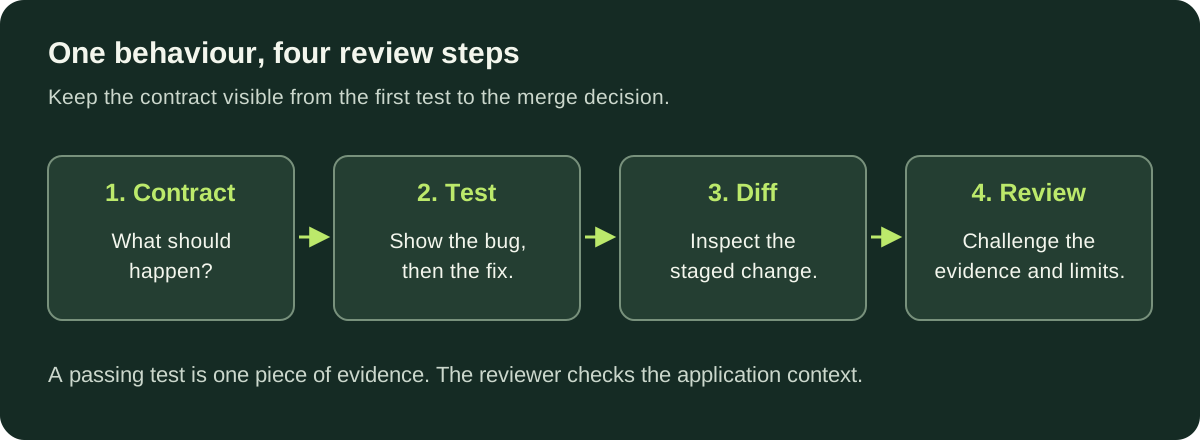
The takeaway: carry the same behaviour statement through the test, the diff and the review.
Reproduce the bug on a branch#
Use a scratch directory for this exercise. You need Git 2.28 or later (for git init -b) and Node.js 22.18 or later with type stripping enabled. Node 22.18 enables type stripping by default without an experimental warning. These .mts files are TypeScript modules; no package installation is needed. Node runs this limited TypeScript syntax without checking its types, so keep your project’s compiler check as a separate step when applying the exercise at work. See the Node.js TypeScript documentation.
Create the directory and repository:
mkdir document-review-lab
cd document-review-lab
git init -b main
Save this deliberately incomplete implementation as select-documents.mts:
export function selectDocuments(
  documents: readonly string[],
  limit: number,
): string[] {
  return documents.slice(0, limit);
}
Assuming your Git commit identity is already configured, record the starting point and create the change branch:
git add select-documents.mts
git commit -m "Add document selection starting point"
git switch -c fix/document-limit
The branch keeps this work’s commits together. It does not isolate uncommitted edits automatically: in an existing project, check git status before starting and deal with unrelated work first. Git documents the branch creation behaviour in its git-switch reference.
Now save this test file as select-documents.test.mts:
import assert from 'node:assert/strict';
import { test } from 'node:test';
import { selectDocuments } from './select-documents.mts';

test('selects the requested prefix without changing the input', () => {
  const documents = ['guide', 'policy', 'faq'];
  assert.deepEqual(selectDocuments(documents, 2), ['guide', 'policy']);
  assert.deepEqual(documents, ['guide', 'policy', 'faq']);
});

test('handles zero, empty input and a limit above the list length', () => {
  assert.deepEqual(selectDocuments(['guide'], 0), []);
  assert.deepEqual(selectDocuments([], 2), []);
  assert.deepEqual(selectDocuments(['guide'], 5), ['guide']);
});

test('rejects invalid numeric limits, including on empty input', () => {
  const invalidLimits = [
    -1, 1.5, NaN, Infinity, Number.MAX_SAFE_INTEGER + 1,
  ];
  for (const limit of invalidLimits) {
    assert.throws(() => selectDocuments(['guide', 'policy'], limit), RangeError);
    assert.throws(() => selectDocuments([], limit), RangeError);
  }
});
Run it:
node --test select-documents.test.mts
The first two tests pass; the invalid-limit test fails because no exception is thrown for -1. That is the failure you want to see before the fix. An import error or missing file is a setup failure, not evidence that the test reproduced the bug. The Node.js test runner documentation explains the runner and its command-line options.
Checking the empty array matters. An early return for empty input could otherwise conceal an invalid limit, making the same argument valid or invalid depending on the data.
Make the fix match the contract#
Replace select-documents.mts with:
export function selectDocuments(
  documents: readonly string[],
  limit: number,
): string[] {
  if (!Number.isSafeInteger(limit) || limit < 0) {
    throw new RangeError('limit must be a non-negative safe integer');
  }
  return documents.slice(0, limit);
}
Run the same command again. All three tests should pass.
The validation belongs before selection because the contract applies even when there are no documents. The function’s boundary is deliberately small: it selects an already ordered list. It does not fetch documents, rank relevance, enforce permissions or count model tokens.
A useful review question is: “What does this test prove?” Here, it checks several specified behaviours of a local function. It does not prove that every caller handles the new exception. In a real application, inspect the call sites and add a test at the boundary where an invalid limit becomes a useful response to the caller.
Inspect what you will actually commit#
Stage only the files belonging to this change, then inspect them:
git status --short
git add select-documents.mts select-documents.test.mts
git diff --cached --stat
git diff --cached
The staging area holds the contents prepared for the next commit. git diff --cached compares those contents with the last commit by default; ordinary git diff shows unstaged changes. The Git diff reference explains that distinction.
Read the diff as the reviewer will. Does the validation implement the contract? Do the tests check outcomes rather than merely repeat the condition? Are there unrelated edits or generated files?
If you edit a staged file again, stage it again before committing. The Git add reference makes clear that staging captures the file contents at the time of git add.
Once the diff is right and the tests pass:
git commit -m "Reject invalid document selection limits"
For this scratch exercise, the local work is complete. To practise with a colleague, use an authorised GitHub repository containing the starting commit on its base branch, publish your fix branch through your usual workflow, and open a pull request from that branch to the agreed base. A repository created only on your laptop will not appear on GitHub by itself.
Give the reviewer a question and evidence#
Use a description like this for the exercise:
Reject invalid document selection limits

Before: a negative limit could return documents.
After: limits must be non-negative safe integers, including for empty input.

Validation: node --test select-documents.test.mts
Before the fix: 2 passed, 1 failed on the missing RangeError.
After the fix: 3 passed.

Please check: is rejection the right caller-facing behaviour for this boundary?
Limits: this only tests selection; caller error handling and retrieval
integration need separate checks before using it in the application.
The reviewer starts with the contract, reads the implementation and tests, and asks what would happen at a caller. On GitHub, they can inspect Files changed, leave specific comments and submit a review. The GitHub review quickstart shows those steps.
| Evidence | Question it helps answer | What it leaves open |
|---|---|---|
| Passing tests | Do these specified examples behave as expected? | Missing cases and integration behaviour |
| Type checking | Does the code satisfy the configured static checks? | Runtime inputs and the correctness of the requirement |
| Human review | Does the change make sense in this application? | Behaviours nobody inspected or exercised |
A useful comment names the consequence: “This now throws for negative limits. Where does the API convert that exception into a response?” That gives the author a concrete action. A vague “handle errors better” does not.
After addressing feedback, rerun the relevant checks and point the reviewer to the new evidence. Merge according to the repository’s rules once the required checks and review are complete.
What this means for your team#
For developers, the practical habit is to make one behaviour easy to inspect: a contract, a reproducing test, a focused diff and an explanation of what remains untested. Apply the same habit when a coding assistant wrote the implementation. The author still needs to understand and explain it.
For architects, look at the boundary decision exposed by the review. Rejecting invalid limits makes a caller mistake visible: the caller must handle the exception and, at an API boundary, turn it into a useful response. Normalising a negative limit to zero would keep the request running, but could hide a configuration bug behind an empty result. Choose deliberately: a shared helper promises every caller either consistent rejection or a documented fallback. Keep that promise in its tests, and decide which layer explains the error to the person making the request.
Do not use the scratch exercise as a complete release process. A database migration, a change to access control or a retrieval change affecting answer quality needs additional evidence. Keep each pull request coherent, but include every coordinated change needed to make its behaviour safe to integrate; a tiny diff is not a goal by itself.
Questions developers ask#
Should I split every change into one file?#
No. The function and its tests belong together because they explain one behaviour. Split changes when they answer independent questions, not simply because they touch several files.
Can I merge when the tests are green?#
Green tests are evidence about the cases you ran. Review the requirement, caller behaviour and repository’s merge rules as well. In this example, a caller that does not handle the new exception remains unfinished integration work.
Where can a team practise this with an AI application?#
Session 1 of Applied AI Solution Architect & FDE establishes a capstone in Git/GitHub, makes its initial engineering decisions explicit and includes a focused code review. This small exercise practises that review habit before the capstone grows into an integrated AI application.